
티스토리 뷰

라이브러리 없이 JS와 CSS로 price range를 만들어봤다.
찾다보니 input양쪽에 동글뱅이를 움직여서 실시간으로 가격변동이 가능한 코드들은 많았으나,
input동그라미 움직이기 + 클릭시 해당위치로 이동을 동시에 가능한 예시가 없어서 직접 구현해봤다 ㅠㅠ.
원하는기능
1. 실시간으로 양쪽 동그라미를 움직이면 가격이 변동하는 기능
2. 클릭시에는 해당 위치로 이동하지만, 양쪽 range중에 가까운 range기준으로 움직이게끔
KakaoTalk_20221118_112053556.mp4
1.82MB
앵귤러 사용자기에 html과 css위주로 봐주세요!
<li class="filter-price-wrap">
                    <div class="filter-price-title">
                        <span [innerHTML]="'Common.Price'|translate">가격</span>
                    </div>

                    <div class="filter-price-display">
                        <span>{{withComma(minValue)}}<span
                                [innerHTML]="currencykey|translate">원</span></span>
                        <span>{{withComma(maxValue)}}<span
                                [innerHTML]="currencykey|translate">원</span></span>
                    </div>
                    <div id="range-slider" role="slider" class="filter-range-wrap"
                        (mouseup)="setPriceRange($event)">
                        <div class="filter-range-slider">
                            <input (input)="setPriceRange($event)" id="rangeMin" type="range"
                                min="0" max="100" value="0" />
                            <input (input)="setPriceRange($event)" id="rangeMax" type="range"
                                min="0" max="100" value="100" />

                            <div class="filter-slider">
                                <div class="filter-track"></div>
                                <div id="filter-range"></div>
                                <div id="thumb-left" class="filter-thumb">
                                </div>
                                <div id="thumb-right" class="filter-thumb"></div>
                            </div>
                        </div>


                    </div>
                </li>
이부분에서 range부분은 바로 이부분
range-slider다
<div id="range-slider" role="slider" class="filter-range-wrap"
                        (mouseup)="setPriceRange($event)">
                        <div class="filter-range-slider">
                            <input (input)="setPriceRange($event)" id="rangeMin" type="range"
                                min="0" max="100" value="0" />
                            <input (input)="setPriceRange($event)" id="rangeMax" type="range"
                                min="0" max="100" value="100" />

                            <div class="filter-slider">
                                <div class="filter-track"></div>
                                <div id="filter-range"></div>
                                <div id="thumb-left" class="filter-thumb">
                                </div>
                                <div id="thumb-right" class="filter-thumb"></div>
                            </div>
                        </div>
input은 2가지가 필요하다 오른쪽에 있는거, 왼쪽에 있는거 id부분을 보면 알수있지만 rangeMin과 rangeMax다.
여기서 기능을 달아줄부분은 3ㄱ4ㅏ지 input에도 setPricerange()가 있고, 가장 맨 위에 range-slider에도 setPriceRange()가 있다.
그밑에 filter-slider부분은 움직일시에 흰색부분말고 회색부분으로 표시해야될 부분과, range바
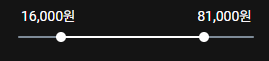
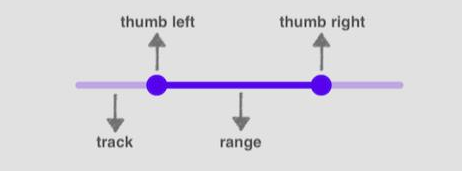
바로 요모양이다!
.filter-range-wrap {
    position: relative;
    width: 236px;
    margin: 0 auto;
    height: 5px;
    padding: 15px 0;
    cursor: pointer;
    margin-top: 40px;
    padding-bottom: 10px;
}

.filter-slider {
    position: relative;
    z-index: 1;
    height: 2px;
}

.filter-track {
    position: absolute;
    z-index: 1;
    left: 0;
    right: 0;
    top: 0;
    bottom: 0;
    border-radius: 5px;
    background-color: #7E8B98
}

#filter-range {
    position: absolute;
    z-index: 2;
    left: 0%;
    right: 0%;
    top: 0;
    bottom: 0;
    border-radius: 5px;
    background-color: #fff;
}

.filter-thumb {
    position: absolute;
    z-index: 3;
    width: 10px;
    height: 10px;
    background-color: #fff;
    border-radius: 50%;
    top: -4px;
}

#thumb-left {
    left: 0%;
}

#thumb-right {
    right: 0%;
}


input[type="range"] {
    position: absolute;
    pointer-events: none;
    appearance: none;
    -webkit-appearance: none;
    z-index: 2;
    height: 4px;
    width: 237px;
    left: -4px;
    opacity: 0;
    top: 12px;
}

input[type="range"]::-webkit-slider-thumb {
    pointer-events: all;
    width: 15px;
    height: 15px;
    background-color: red;
    border-radius: 50%;
    top: 6px;
    cursor: pointer;
    appearance: none;
    -webkit-appearance: none;
}
setPriceRange(event: Event | MouseEvent) {
        const minInput = (document.getElementById('rangeMin') as HTMLInputElement);
        const maxInput = (document.getElementById('rangeMax') as HTMLInputElement);

        const thumbLeft = (document.getElementById('thumb-left') as HTMLDivElement);
        const thumbRight = (document.getElementById('thumb-right') as HTMLDivElement);
        const range = (document.getElementById('filter-range') as HTMLDivElement);

        const target = (event.target as HTMLInputElement);
        const [min, max] = [parseInt(target.min), parseInt(target.max)];

        const current = Math.floor((event as MouseEvent).clientX);
        const position = ((current - this.left) * 10) / this.width;
        const average = (Number(minInput.value) + Number(maxInput.value)) / 2;
        let targetPercent = Math.ceil(position * 10);

        if (target.id === 'rangeMin') {

            (event.target as HTMLInputElement).value = String(Math.min(parseInt(target.value), parseInt(maxInput.value) - 10));

            const percent = Math.ceil(((Number(target.value) - min) / (max - min)) * 100);
            thumbLeft.style.left = percent + "%";
            range.style.left = percent + "%";

            this.minValue = this.setPrice(Number(target.value) * this.priceGap);
            this.searchCondition.minprice = this.minValue;
            this.searchCondition.maxprice = this.maxValue;

        } else if (target.id === 'rangeMax') {
            (event.target as HTMLInputElement).value = String(Math.max(parseInt(target.value), parseInt(minInput.value) + 10));

            const percent = Math.ceil(((Number(target.value) - min) / (max - min)) * 100);
            thumbRight.style.right = 100 - percent + "%";
            range.style.right = 100 - percent + "%";

            this.maxValue = this.setPrice(Number(target.value) * this.priceGap);
            this.searchCondition.maxprice = this.maxValue;
            this.searchCondition.minprice = this.minValue;
        } else {
            if (targetPercent < 0) {
                minInput.value = '0';
                thumbLeft.style.left = 0 + "%";
                range.style.left = 0 + "%";
                this.minValue = 0;
                this.searchCondition.minprice = 1;
                this.updateSearchCondition();
                return;
            } else if (targetPercent > 100) {
                maxInput.value = '100';
                thumbRight.style.right = 0 + "%";
                range.style.right = 0 + "%";
                this.maxValue = this.setPrice(100000);
                this.searchCondition.maxprice = this.maxValue;
                this.updateSearchCondition();
                return;
            }
            //들어오는 position값이 현재 input위치들의 average 중간값보다 큰지 아닌지 구하는 이유?
            //-> 왼쪽 input에 가까운지 오른쪽 output에 가까운지를 계산하여 가까운쪽의 input을 이동시키기위하여
            if (targetPercent < average) {
                if (targetPercent < 0) {
                    minInput.value = '0';
                    thumbLeft.style.left = 0 + "%";
                    range.style.left = 0 + "%";
                    this.minValue = 0;
                    this.searchCondition.minprice = 1;
                    this.updateSearchCondition();
                    return;
                }
                targetPercent = Math.min(targetPercent, parseInt(maxInput.value) - 10);
                minInput.value = String(targetPercent);
                thumbLeft.style.left = targetPercent + "%";
                range.style.left = targetPercent + "%";

                this.minValue = this.setPrice(targetPercent * this.priceGap);

                if (this.minValue === 0) {
                    this.searchCondition.minprice = 1;
                    this.searchCondition.maxprice = this.maxValue;
                } else {
                    this.searchCondition.minprice = this.minValue;
                    this.searchCondition.maxprice = this.maxValue;
                }

            } else {
                targetPercent = Math.max(targetPercent, parseInt(minInput.value) + 10);
                maxInput.value = String(targetPercent);
                thumbRight.style.right = 100 - targetPercent + "%";
                range.style.right = 100 - targetPercent + "%";

                this.maxValue = this.setPrice(targetPercent * this.priceGap);
                this.searchCondition.minprice = this.minValue;
                this.searchCondition.maxprice = this.maxValue;
            }
        }

        if (event.type === 'mouseup') {
            this.updateSearchCondition();
        }
    }
설..설명은 나중에 정리해서올려야겟다
급귀찮..